Shortlisting & Selection applications in :Recruit Essentials

Once you start receiving applications, :Recruit Essentials enables you to easily shortlist applicants on an individual or bulk level. In this article, we’ll guide you through the shortlisting & selection process to help you save time identifying the best talent for your organisation.

How to do individual shortlisting & selection

There will be many occasions when you need to shortlist your applicants individually (rather than in bulk) to make careful recruitment decisions. Here are some tips to help you get started:

1. Head to the ‘Applications’ tab

Here, you’ll find all the applications for your vacancy. Click on a candidates name to view the details of their application.
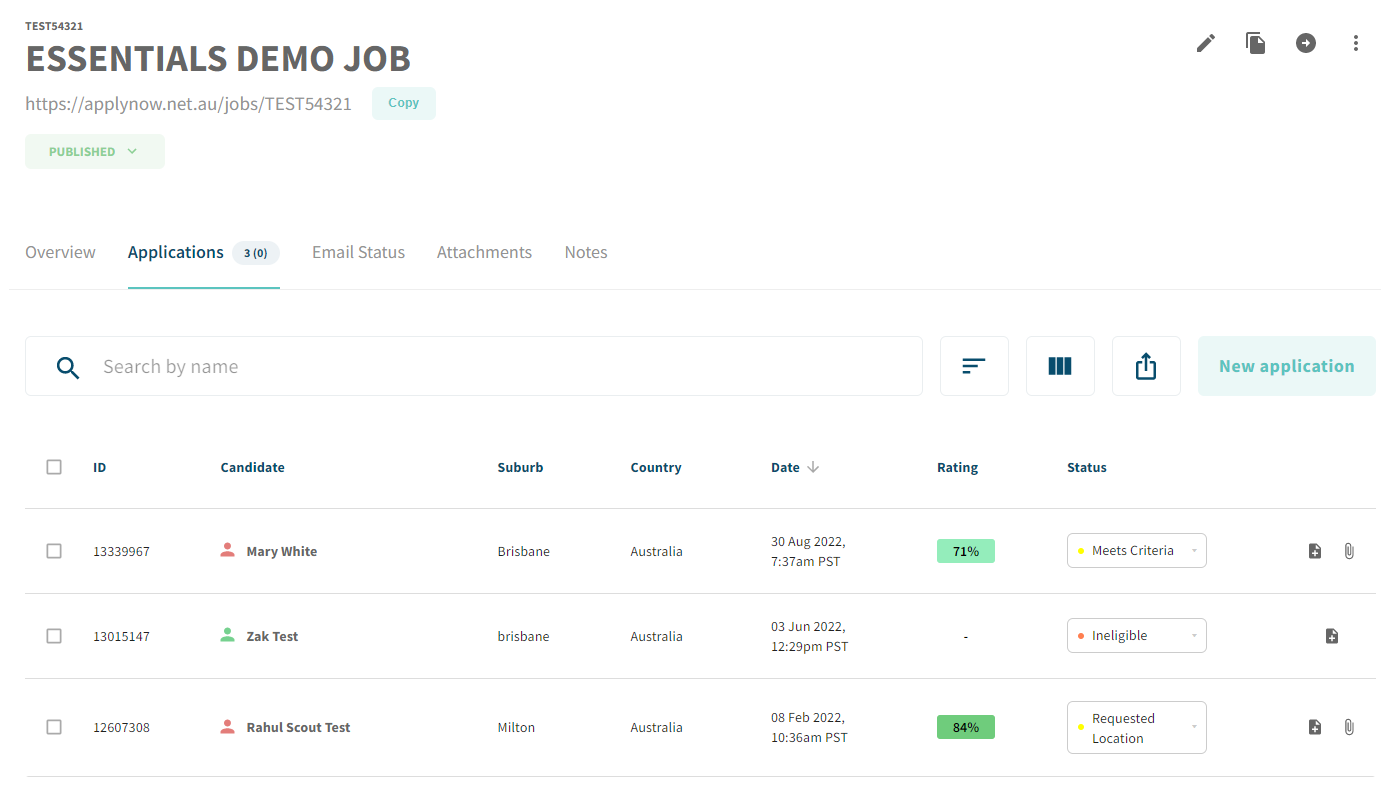
View your applications in our ATS

2. Navigate to the top menu bar.

Here, you can move a candidate to another job, clone, or trash an application. 

3. View and edit a candidate’s ratings

In this section, you can rate the candidate based on their interview, and reference checks. The ratings from screening questions are also consolidated into one number.
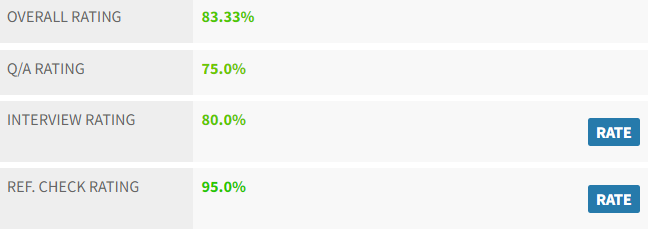
Review and edit your candidate ratings in :Recruit Essentials

4. View and edit a candidate’s status

In this section, you can change the candidate’s status using the drop down menu.

5. Rate responses to screening questions

Scroll down to view an applicant’s responses to screening questions. You can rate the responses using a scale of 1-5 (with 5 being a 100% answer).

Rate candidates based on how they answer your screening questions

6. Add Suitability Comment

Think of this as a whiteboard marker, not a permanent marker. The notes you take here can be edited or deleted later on, as your understanding of a candidate’s suitability changes over time.

Add suitability comments to candidates in your pool

7. View Activities

All actions that you take on an application will “live” here. You can also use the buttons to take additional actions including:

    • Add Note: This is a permanent note that is left on the application.
    • Send Email: Send an email to the applicant. 
    • E-mail External: Allows you to email the application to an email address of your choice (e.g. a colleague). 
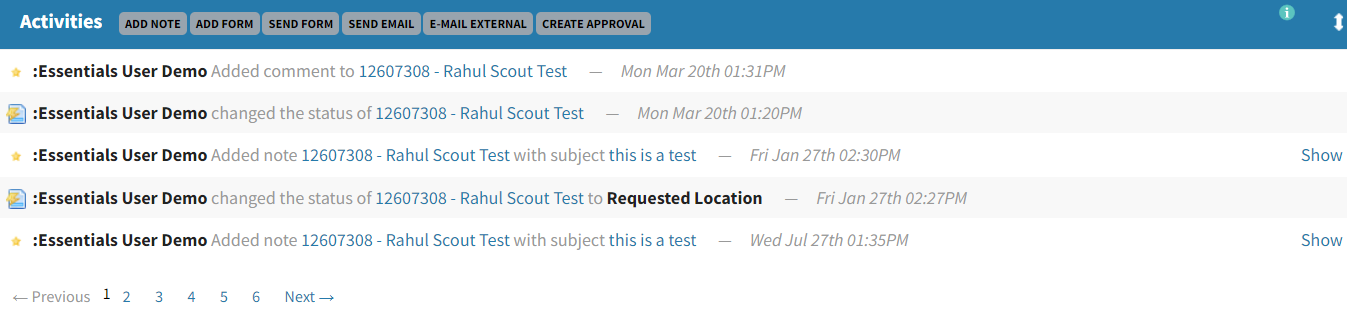
Track activities per candidates in your ATS

8. Some other useful tips
  1. You can toggle the order of the sections on your application pages to best suit your process
  2. Attachments can be manually attached if you need them.
  3. Tasks can be assigned to yourself or another user, to progress an applicant and your recruitment goals. 


How to shortlist in bulk

Start in the ‘Applications’ tab. Here, you’ll find all the applications for your vacancy. In the menu bar, you’ll find an array of functions to help you shortlist candidates in bulk.

View your applications in our ATS

  • Email Candidates: This function allows you to bulk email candidates using your email templates, or a custom message. Consistent communication with your applicants is key to a great candidate experience, which positively impacts your employer brand.
  • Email Candidates By Status: This gives you the ability to target all applicants with a particular status in a given job. If you want to ensure that candidates who’ve already received a particular email template don’t receive a duplicate, you can select “Only New”.
  • Change Status in Bulk: This allows you to bulk update applicants, for example, from “New” to “Unsuccessful”.
  • Bulk External Email: You can forward applications via email to anyone, even someone who is not setup as a user in :Recruit Essentials. When you use this function, the recipient is sent an email with a list of hyperlinked names, which takes them to a web browser displaying an external copy of the application form for that person. All of the applicant details appear on that form. You can choose whether to include candidate attachments in the Bulk External Email.
  • Bulk Move Applications: You can move selected applications to be housed in another job.
  • CVSs: This gives you access to low-level reporting. This function extracts applications information in the form of an Excel spreadsheet.

Related posts

The Job Survey: The 15-Minute Step That Makes Every Hire More Accurate

Tags
Share this blog
Sign up for our newsletter

Receive the latest industry news, exclusive event invites, and useful content straight to your inbox.

Related posts

The Job Survey: The 15-Minute Step That Makes Every Hire More Accurate

10 Skills That Separate Great In-House Recruiters From Average Ones

AI in Talent Acquisition: A 6-Step Framework for Going AI-Native

Why Choose Scout Talent

“I’m aware of the silly tricks that those in the industry play, which is why we use Scout Talent instead of an agency! We’ve actually done A/B testing on Scout Talent vs a recruiter, and the quality was chalk and cheese- no kidding, you can quote me.”

– Melissa Kirby
Sharpe and Abel

Our Total Talent Acquisition Software

Recruitment Campaign Services
The right mix of expertise, structure, and care, our recruitment campaigns make hiring faster, easier, and more cost-effective

Employer Branding
Position your company as an employer of choice with a strong employer brand

Employee Engagement Surveys
Gain insights on how your people feel at work so you can boost performance, retention, and culture

Recruitment Process Outsourcing
Expert recruiters and proven processes to hire top talent efficiently and more cost-effectively

Learning Services
We design customised digital training, delivered through a powerful LMS that streamlines, tracks, and measures learning—building skills and boosting performance.

Key Benefits

Expert-led campaigns crafted with strategy and care to connect you with the right people quickly, easily and cost-effectively.
Combine authentic employer branding with engagement insights to create workplaces where top talent wants to belong and stay.
Access seasoned recruiters who work inside your business—bringing flexibility and proven processes without the cost or risk of extra headcount.
Show candidates and employees you invest in their future with development pathways that make your organisation a magnet for great people.
Why Choose Scout Talent

“I’ve been a user of Scout’s software for many years, working with both the full enterprise solution :Recruit and the lite :Essentials platform. I appreciate that Scout offers fit-for-purpose options to suit different business needs.


Scout’s ATS has been instrumental in driving efficiency and productivity. In a previous project …This transformation saved our team significant time… and eliminated room for error with its intuitive workflow and transparent features.


It’s a fantastic product, and we couldn’t be happier with the results.”

– Wendy Woodford
People and Culture Manager
Housing Trust

Our Total Talent Acquisition Software

:Recruit
Your AI-powered total talent acquisition ATS and CRM solution

:Recruit Essentials
Your AI-powered Lite version of :Recruit tailored for small organisations

:Onboard
Your digital contract creation

:Recruit Pro
Your AI-powered :Recruit + :Onboard, backed by human expertise, tools, analytics, and specialist support

:Engage
Your recruitment marketing and candidate pooling platform

Scout Learning
Your customisable LMS with specialist support

Scout Talent App
Your mobile application helping you hire on the go

Felix
Your AI-powered talent acquisition assistant

Key Features

Post once, publish everywhere, and track candidates from application to hire in a single platform.

Leverage AI to screen faster, uncover hidden talent, and craft compelling job ads that attract the right candidates.

Make confident hiring decisions with dashboards that highlight pipeline health, recruiter performance, and ROI.

Connect with job boards, HRIS, payroll, and more, keeping your recruitment process fluid and connected.