
Welcome to your monthly product release notes! All about boosting your productivity and making your recruitment process smoother than ever. Get ready to explore some fantastic new updates and enhancements designed to save you time and effort.
To kick things off, we’re sharing some top tips to help you leverage automation and optimise your workflow. Explore these tips, then dive into the detailed release notes below for all the latest improvements.
Additionally, we are thrilled to announce the winners of our 2024 Scout Talent Software User Feedback Survey. Thank you to everyone who participated! Scroll below to see if you’ve won. Winners will be contacted directly by their Sales Account Executive this week.
Monthly Tips: Lean on Automation
1. Automate Your Candidate Screening
 Make your recruitment process easier with automation. You can set up questions for candidates to answer during their application and, based on their answers, the system will automatically update their status and sort them into different stages of your recruitment pipeline. For example, if a candidate answers a key prescreening question indicating they have the required years of experience or a specific certification, their status can be automatically updated to “Qualified” or “Move to Interview.” Conversely, if a candidate does not meet certain essential criteria, their status can be set to “Hold” or similar, allowing you to focus your time and attention on the most promising applicants.
Note: This feature is available on both Scout Talent :Recruit Enterprise & :Recruit Essentials. Try it out today!
2. Keep Candidates in the Loop with Automated Emails (available on :Recruit Only):
 Enhance candidate communication and improve the candidate experience with :Recruit’s applicant status email trigger response feature. You can automatically send personalised emails based on changes in an applicant’s status, such as moving from “Applied” to “Interview Scheduled.” Customise these emails with the candidate’s name, the position applied for, and next steps. You can also set delays, ensuring timely follow-ups and reminders. This automation keeps candidates informed and engaged throughout the recruitment process, maintaining your employer brand and reducing manual effort.
Note: This feature is only available on :Recruit Enterprise. Reach out to your Sales Account Executive or the Client success team for a demonstration.
3. Clone Jobs to Save Time
 Cloning jobs can save a lot of time by not having to rewrite information or manually fill in all the details or redo any automation you’ve already set up. Insider Tip: Give the cloned job a quick read to make sure it still meets your current requirements and matches your workflow, including automations, screening questions, and any attachments.
Note: This feature is available on both Scout Talent :Recruit Enterprise & :Recruit Essentials. Give it a go today!
Explore the Latest Updates.
Now that you’ve seen how automation can enhance your productivity, let’s dive into the new updates and features we’ve rolled out this month.

Candidate Management
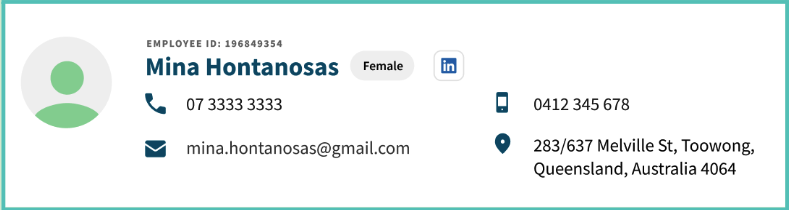
- LinkedIn Integration: Candidates’ LinkedIn pages can now be viewed via an icon that appears next to their name (see below), allowing you to quickly access their professional profiles and gather additional insights to make more informed hiring decisions.
- Recently Viewed Candidates Icon: We’ve added an icon for recently viewed candidates to be consistent with other pages in the recently viewed list.
- Editable Address Fields: Street number and type have been added as editable fields for candidates.
Communication and Email Management
- Email Signature Renaming: Renamed “letterhead” to “email signature” to avoid confusion. This change allows for the inclusion of branded email signatures at the bottom of every email template you create.
Calendar and Event Management
- Event Deletion: You can now delete events straight from the Calendar List View, simplifying calendar management and saving you time by allowing quick and easy removal of events.
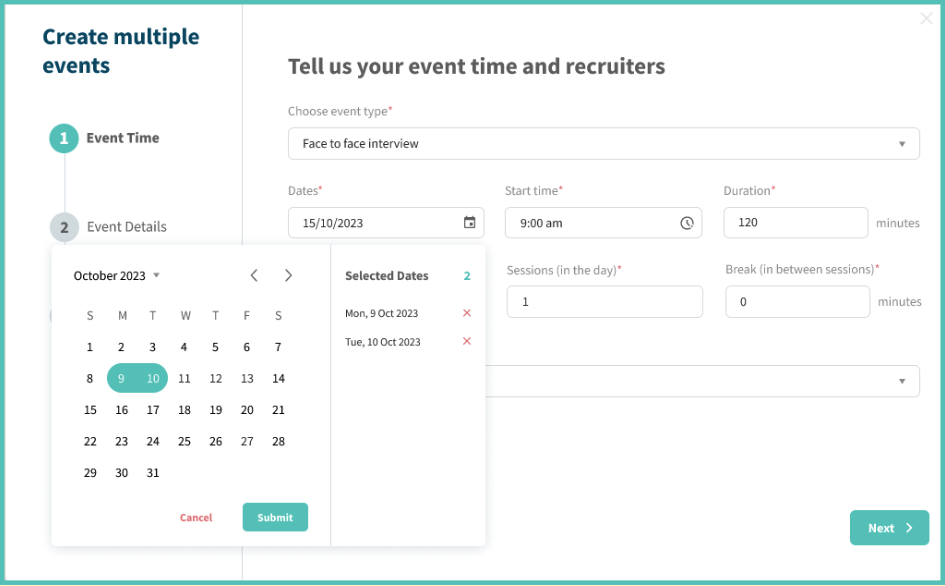
- Multi-Date Selection for Events: We’ve revamped your interface to make creating and managing multiple events over different months easier. See below:
User Interface Adjustments
- Local Date Format: Changed the date format to reflect the local conventions of the recruiter.
- Duplicate Candidates Popup: Made the duplicate candidates popup scrollable to avoid issues when presenting a large number of duplicates.
- Relabeled “New Question” Button: Relabeled the “New Question” button from what was a confusing “New Field” button.
Candidate Experience
- Answer Review: Candidates can now review all of their answers, including confidential answers, before clicking submit on an application.
AI Suite Updates
- AI Summary Improvements: We’ve made updates to the look and feel of your AI Summary window making it more intuitive and easier to use. Check it out today!

:Recruit
- FoundU integration – We have launched a new and improved integration with FoundU. If you or your team use FoundU and are interested in learning more about it, please contact your SAE or the CSS team.
:Engage
- Enhanced Filtering Capabilities: :Engage now offers improved filtering, no longer restricting initial searches to the previous 3 months. Using a tag will now return all candidates with that tag, giving you the choice to specify dates.
- Duplicate Entry Prevention: To prevent duplicate entries, we’ve implemented a feature in :Engage that stops candidates from being added multiple times to the same talent pool.
- Improved Unsubscribe Indicator: Changed the red X icon to a clearer Yes/No indicator to show whether a candidate is unsubscribed in :Engage. This supports your employer branding efforts and enhances your ability to communicate effectively with subscribers.
- External Email Integration: Now you can email selected candidates directly from your talent pools to other stakeholders and hiring team members, improving your engagement process.
- Phone Number and Attachment Visibility: You can now see phone numbers and preview attachments straight from the candidate pool.

- Candidate Editing Bug Fixed: Resolved an issue where candidates couldn’t be edited.
- Attachment Saving Issue Fixed: Ensured that attachments are saved correctly when candidates save their applications.
- Candidate Icon Display Corrected: Fixed an issue where all candidates were incorrectly displayed as new candidates (green icon) regardless of their status.
- Gmail CSV Download Issue Resolved: Added an alternate link in cases where Gmail prevented users from downloading CSV files of their requested reports.
- Date Field Validation Adjusted: Removed the red border from non-mandatory date fields that were left empty, which previously made them appear mandatory.
- Event Display on iOS Devices Restored: Fixed a bug that prevented events from showing on iOS devices.
- Timezone Display in Event Notifications Fixed: Corrected the display of the timezone for candidates to now be in their local timezone in event notifications.
Congratulations to the following winners!
- N.Charles – Australia
- V. Papadopoulos – Australia
- J. Copeland – Canada
- S. McInnes – Canada
- R. Phillips – New Zealand
Thank you to everyone who participated! Winners will be contacted directly by their Sales Account Executive this week.
Coming Soon – Applications Workflow Relaunch
A reminder to stay tuned for exciting updates to your Applications workflow! Our latest enhancements will provide a smoother, more user-friendly experience. Seamlessly navigate applications, attach necessary documents, follow up with candidates, and make swift decisions with the help of our AI-powered summaries. These updates are designed to continue to make your recruitment process more effective and efficient.
We continuously enhance our platform based on your valuable feedback. We appreciate your input, so please don’t hesitate to contact us at Support@scouttalent.com.au with any suggestions or ideas. We look forward to hearing from you and working together to shape the future of our product.
Keep an eye out for more updates and happy recruiting!