
New in :Recruit: Job Template Builder

Simplify job creation with the new Job Template Builder

Creating consistent, high-quality job listings shouldn’t take unnecessary time or effort.

Previously, users often had to choose between cloning entire jobs or starting from scratch — both approaches made it difficult to save and reuse important configurations. Our new Job Template Builder bridges that gap, making it easier than ever to create, save, and reuse job setups with just a few clicks.

This update introduces a more intuitive, flexible way for HR Admins to manage standardised job templates without confusion or extra steps.


What’s new in a nutshell

  • Create Templates Instantly: Save any job as a reusable template directly from the Job Edit page using the new “Save job as template” option.
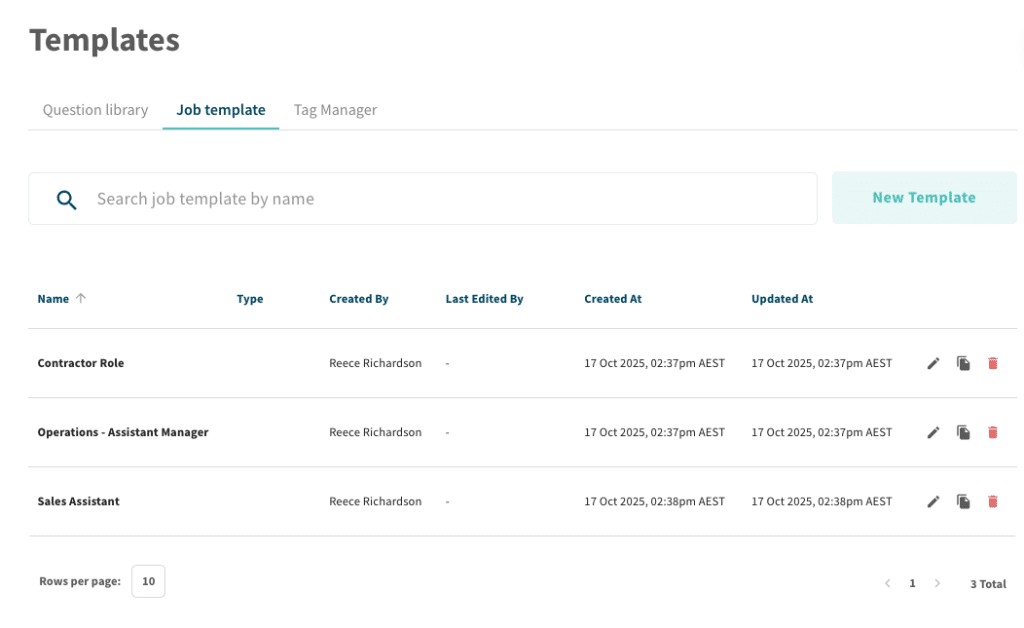
  • Dedicated Templates Hub: Access and manage all templates from the new Job Templates tab under the Templates section.
  • Full Detail Control: Save as much or as little job information as you want, including job settings, automations, and expiry details.
  • Automatic Conversion: Existing job templates have been upgraded automatically to the new builder format for consistency and ease of use.
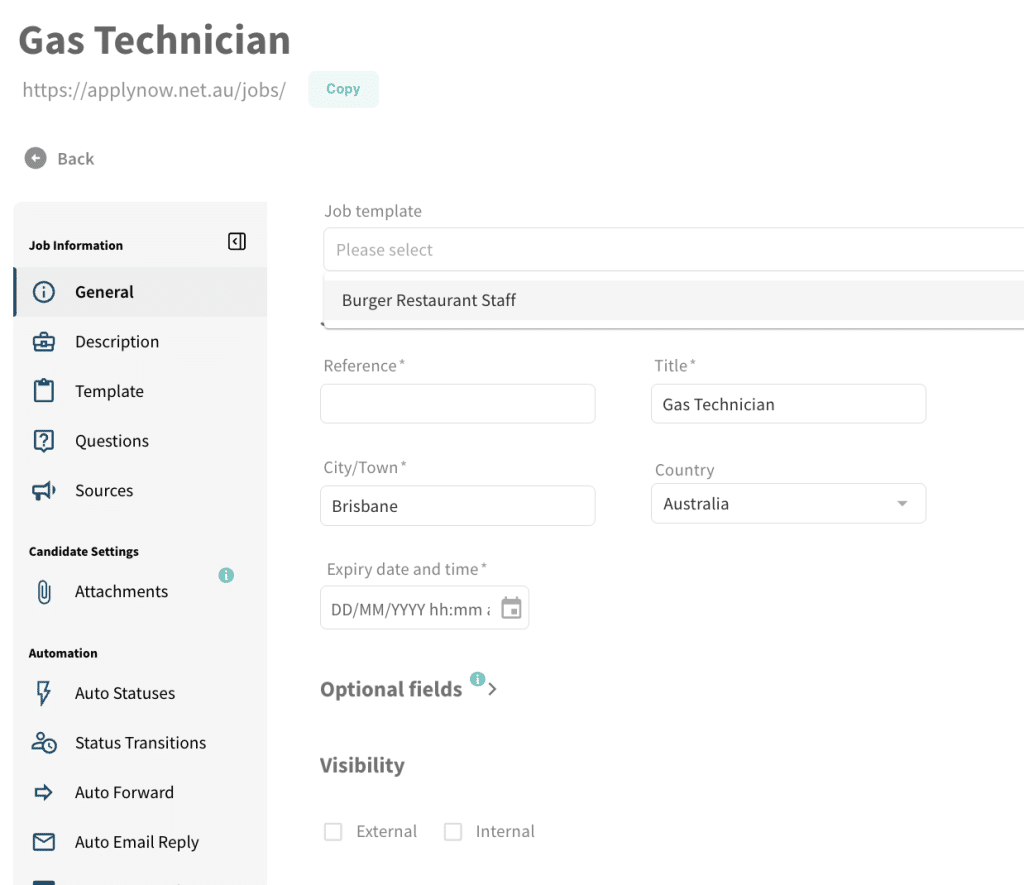
Job Template selector

What this means for your team

The Job Template Builder improves recruitment workflows in three key ways:

  • Faster Job Setup: Reduce time spent recreating similar job postings. Save and reuse templates with prefilled details and consistent configurations, so your team can publish new jobs faster.
  • Consistency Across Listings: Standardise job formatting, expiry settings, and automations across teams. Every template ensures compliance with internal processes and a consistent candidate experience.
  • Smarter Template Management: Templates now exist as their own category — no more confusion between active jobs and saved templates. They can’t be accidentally published, archived, or deleted like before.

A deeper dive: How the Job Template Builder works

Creating a job template from the Job Edit page

  1. 1
    Open the Job Edit page for any existing job.
  2. 2
    Click the Save job as template button (bookmark icon with a plus sign) in the top right corner.
  3. 3
    Add a template name and click Create.
  4. 4

    Make any desired edits to job details, including expiry dates or settings, then click Save.
Creating a job template from the Templates tab

  1. 1
    Navigate to Templates in the sidebar, then open the Job Template tab.
  2. 2
    Click New Template on the top right.
  3. 3
    Add a name for your template and click Create.
  4. 4

    Adjust job details as needed, then click Save to finalise.

Using a job template

  1. 1
    Create a new job and open its Job Edit page.
  2. 2
    Select a template from the dropdown menu at the top of the page.
  3. 3
    Confirm that you want to apply the template and override existing details, then click Use Template.
  4. 4
    Click Save in the bottom right to finalise your job setup.

Frequently Asked Questions (FAQ)

What happens to existing job templates?

All existing templates have been automatically converted into the new Job Template Builder format. They are now accessible under the Job Templates tab, ready for immediate use.

Can templates be published or archived?

No. Templates are stored separately from jobs and cannot be published or archived without being added to a job. This prevents accidental actions and keeps templates strictly for job creation purposes.

Can I update a saved template?

Yes, you can edit any existing template by opening it from the Job Templates tab, making changes, and saving again.

Can templates include automations and expiry settings?

Yes. Templates can store all facets of a job’s configuration — from automations and workflows to expiry lengths and job details.


Ready to create smarter, faster job listings?

The Job Template Builder brings flexibility and structure to your job creation process. With reusable templates that capture the right level of detail, your team can build new listings in seconds — without missing key configuration details.

Get started with the Job Template Builder today to streamline your hiring workflow.

For setup guidance or best practices, contact our Customer Success team.

Related posts

For the Love of the Game: How Recruiters Can Fall Back in Love with Recruiting

Tags
Share this blog
Sign up for our newsletter

Receive the latest industry news, exclusive event invites, and useful content straight to your inbox.

Related posts

For the Love of the Game: How Recruiters Can Fall Back in Love with Recruiting

5 Tips for SMB Recruiters to Master Value First Hiring

Outsource to Succeed: The Benefits of Recruitment Process Outsourcing (RPO) for Mid-Sized Businesses

Why Choose Scout Talent

“I’m aware of the silly tricks that those in the industry play, which is why we use Scout Talent instead of an agency! We’ve actually done A/B testing on Scout Talent vs a recruiter, and the quality was chalk and cheese- no kidding, you can quote me.”

– Melissa Kirby
Sharpe and Abel

Our Total Talent Acquisition Software

Recruitment Campaign Services
The right mix of expertise, structure, and care, our recruitment campaigns make hiring faster, easier, and more cost-effective

Employer Branding
Position your company as an employer of choice with a strong employer brand

Employee Engagement Surveys
Gain insights on how your people feel at work so you can boost performance, retention, and culture

Recruitment Process Outsourcing
Expert recruiters and proven processes to hire top talent efficiently and more cost-effectively

Learning Services
We design customised digital training, delivered through a powerful LMS that streamlines, tracks, and measures learning—building skills and boosting performance.

Key Benefits

Expert-led campaigns crafted with strategy and care to connect you with the right people quickly, easily and cost-effectively.
Combine authentic employer branding with engagement insights to create workplaces where top talent wants to belong and stay.
Access seasoned recruiters who work inside your business—bringing flexibility and proven processes without the cost or risk of extra headcount.
Show candidates and employees you invest in their future with development pathways that make your organisation a magnet for great people.
Why Choose Scout Talent

“I’ve been a user of Scout’s software for many years, working with both the full enterprise solution :Recruit and the lite :Essentials platform. I appreciate that Scout offers fit-for-purpose options to suit different business needs.


Scout’s ATS has been instrumental in driving efficiency and productivity. In a previous project …This transformation saved our team significant time… and eliminated room for error with its intuitive workflow and transparent features.


It’s a fantastic product, and we couldn’t be happier with the results.”

– Wendy Woodford
People and Culture Manager
Housing Trust

Our Total Talent Acquisition Software

:Recruit
Your AI-powered total talent acquisition ATS and CRM solution

:Recruit Essentials
Your AI-powered Lite version of :Recruit tailored for small organisations

:Onboard
Your digital contract creation

:Recruit Pro
Your AI-powered :Recruit + :Onboard, backed by human expertise, tools, analytics, and specialist support

:Engage
Your recruitment marketing and candidate pooling platform

Scout Learning
Your customisable LMS with specialist support

Scout Talent App
Your mobile application helping you hire on the go

Felix
Your AI-powered talent acquisition assistant

Key Features

Post once, publish everywhere, and track candidates from application to hire in a single platform.

Leverage AI to screen faster, uncover hidden talent, and craft compelling job ads that attract the right candidates.

Make confident hiring decisions with dashboards that highlight pipeline health, recruiter performance, and ROI.

Connect with job boards, HRIS, payroll, and more, keeping your recruitment process fluid and connected.